Features

Everything you expect from a load planner — and more.

Highlights

🚛 Finds the most efficient plan automatically — lower cost

Just enter your cargo list; the app finds the tightest layout that uses every centimetre of the vehicle and container. Fewer trips, fewer vehicles, lower freight cost.

📍 Load by delivery stop — lighter operations

In multi-stop shipments the first cargo to unload sits nearest the door and the last stop deepest. You no longer reshuffle the load at each stop — cutting effort and time.

🏷️ QR order labels — no wrong or missing deliveries

For groupage/consolidation forwarders: every box and pallet gets an order-specific QR label. Wrong cargo never reaches the wrong place and missing deliveries are prevented. With "Save Plan" you update your consolidation container each order, print its labels and send the warehouse a clear loading-plan report.

⚖️ Axle load & legal balance — penalty-free shipping

Calculates the load on tractor and trailer axles and warns when EU/TR legal limits are exceeded. Safe loads that pass the weighbridge without trouble.

📄 Corporate, digitally signed PDF plan

Give the warehouse and customer clear instructions in a single letterheaded, digitally signed loading report.

All Features

Adding cargo

  • Cargo is entered in the Cargo List tab, one row per item with every option side by side like a table; when you finish a row the next one opens by itself and the Tab key moves you from row to row. The plan appears in the separate Loading tab.
  • Enter all details of your cargo — name, size, quantity and weight — manually.
  • Import your cargo list from a CSV or Excel file in one go. No fixed format required; column matching recognises each customer's own list automatically.
  • Save frequently used cargo as templates and recall them with one click.
  • Work in metric (cm-kg) or imperial (inch-lb) units.
  • Choose the measurement unit (m, cm, mm, inch, ft) and the cargo's rotation freedom during import; lists prepared in metres convert automatically.
  • Filter cargo by name in long lists; fully loaded groups drop to the bottom while incomplete ones stay on top.

Cargo safety rules

  • Mark each item stackable or non-stackable to stop anything being placed on fragile cargo.
  • Set how many units may stack to prevent crushing in transit.
  • Define the maximum weight allowed on top of an item so lower boxes are planned without being crushed.
  • Force certain items to sit on the vehicle floor only.
  • Choose the rotation directions per item; the app tries width×length×height options to use maximum volume.
  • The app keeps every box supported from below — no floating or unstable stacks.
  • A box is never placed on top of a much lighter box, and boxes tucked under an overhang are checked to make sure they can carry the load above.

Equipment

  • 15 ready equipment types with predefined dimensions (curtain-side truck, mega truck, rigid truck, van, 20′/40′/40′HC/45′HC container, Open Top, Flat Rack and Platform). You can revise these dimensions.
  • Define custom equipment with your own dimensions for any vehicle not in the list.
  • On open equipment (Open Top, Flat Rack, Platform) the app automatically computes cargo overhanging the top, sides or ends.
  • If a load does not fit, the app tells you which axis is exceeded and suggests equipment that fits.

Automatic placement

  • Just enter the cargo list; the app finds the most efficient 3D layout automatically.
  • For regular loads like pallets it applies industry-standard lane patterns (e.g. 33 pallets on a truck floor) automatically.
  • Choose a “Compact” mode that stacks tightly or a “Spread on floor” mode that uses the full floor at the same tightness while minimising height.
  • The layout follows a truly loadable order: lower items first, then upper ones; impossible sequences never occur.
  • Fill a whole row in one click in a chosen direction, or remove a slice.
  • When capacity is full the app stops and clearly states why the remaining items did not fit.

Manual editing

  • Drag and drop items to place them by hand, tracking placed and remaining counts live.
  • Snapping aligns boxes to walls and neighbours automatically; you can turn it off and undo any action.

Visualisation

  • Inspect your load in a rotatable, zoomable 3D view and in top, side and door 2D sections.
  • Play the loading steps from start to finish to see which box is loaded when.
  • Each cargo type and stop is shown in a different colour; pick a light or dark theme.
  • Click a cargo in the list to see exactly where it is loaded in the container: the selected cargo stays coloured while the rest turn transparent.
  • Turn on on-box name labels to read which cargo each box is, right in the 3D view.

Balance & fill

  • The app computes the load’s centre of gravity (lengthwise and sideways) and warns if it drifts off centre.
  • It calculates axle loads, warns when legal limits are exceeded and flags the risk of the front axle lifting.
  • See used and remaining volume, length, weight and item count with a fill percentage in a table.

Report

  • Create a letterheaded, corporate PDF report with your logo and company details; report number, customer name and order number appear automatically.
  • The report includes 3D and 2D images plus a step-by-step loading plan.
  • The report is digitally signed; if the document is altered the signature becomes invalid, revealing tampering.
  • Save as PDF, print or prepare it as an e-mail attachment.

Labels

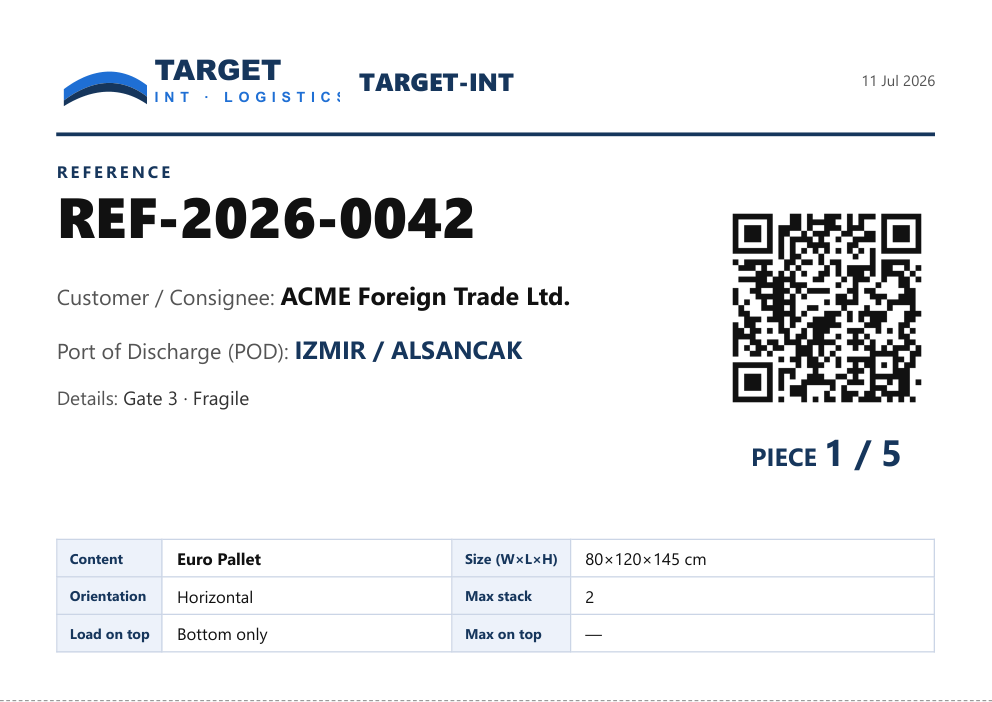
  • For groupage and consolidation work, print QR-coded labels carrying the reference, consignee and port of discharge for each order; wrong cargo never goes to the wrong place and missing deliveries are prevented.
  • Labels are A5, two per page and cut-lined.

Multi-equipment & plan management

  • Move cargo that does not fit one vehicle to the next, with a separate report per equipment plus a grand total.
  • Save and open plans by name, export/import as files; update your consolidation container from the saved plan for each new order.
  • Use “Compare Plans” to compare the statistics of the Compact and Spread-on-floor layouts and pick the best.

General

  • Available in Turkish, English, German, French and Spanish.
  • Define your company details and logo once.
  • Runs fully offline; your load and route data are never sent to the cloud — they stay on your device.
  • New versions update automatically.
  • After install, try all Pro features free for 15 days.
Free Download · Windows / Mac

Professional, ready-to-use output

Digitally-signed PDF reports with your logo and QR group labels for warehouse/port — example: TARGET-INT.
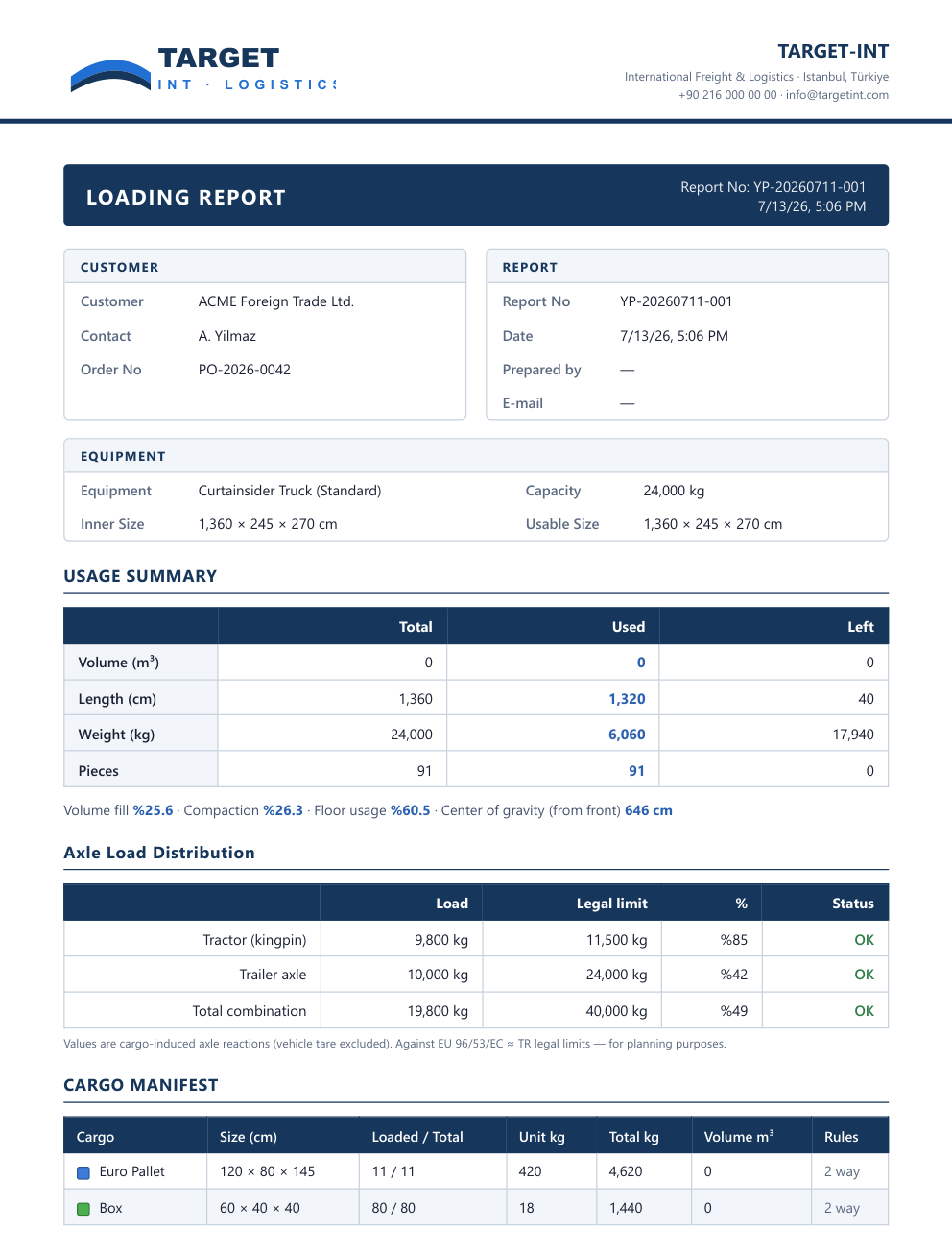
report
Corporate loading report (PDF)
label
QR group (customer) label